Supports Nexio Video Server
Cerify Automation
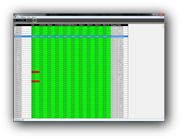
BCI has built a simple-to-use application that will automatically check all newly ingested Nexio® Video Server ID's using the Tektronix Cerify product. Tektronix® has developed an amazing product to check the integrity of your video files before they go to air. BCI has built a way of automating the entire process and giving the operators some basic information if the clip is ready to air or not. Simply ingest the clip, BCI will FTP the new clip off to the Cerify™ system, Cerify™ will process the video file according to the jobs you would like it to perform and then BCI will read the Cerify™ XML report and present it to the user in a simple-to-read grid. If operators see something in red (picture to the right) on a clip, they know enough to recoginize the problem is closed caption (example on right), low audio, or other tests you have configured in Cerify™. Manually moving files and reading lengthy XML files is no longer necessary. Improve your on-air presentation without the extra work. Fully automated and easy to install.
Features:
- Auto FTP clips off Nexio server to Cerify™ once they stop growing (recording)
- Cerify™ process the video file
- BCI opens the new XML report and processes based on the configuration
- Displays the results to the operators in the ingest room
- Self purges the video files from the Cerify™ system
Drivers:
Server Drivers:
- Imagine Communications® Nexio®
- Cerify™ XML file format
© Broadcast Controls Inc.
Nexio®, Nexio Amp® ,LogoMotion, Logomotion2, MediaBase™,MediaBasePro™ Opus™,Selenio™, SelenioICE™, x75™, x85™, are registered to Imagine Communications®
CAP-1000™, Cherrypicker®, DM-6400™ are registered to Arris®
DCM™ is registered to Cisco®
Flexicart™ is registered to Sony®
Cerify™ is registered to Tektronix®
All other trademarks are registered to their respective companies.